Monitor your geographically distributed VoIP deployment
ManageEngine releases new Distributed Edition of VQManager-version 7.0 which is highly scalable for mid and large Enterprises and Service Providers with geographically distributed locations.
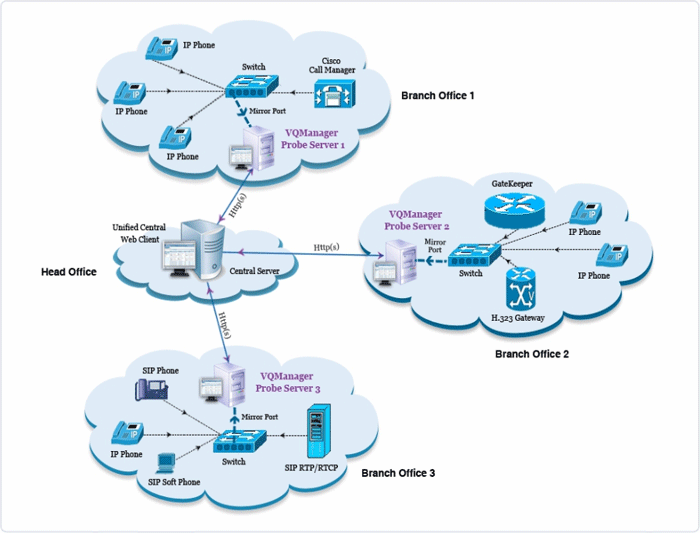
VQManager Distributed Edition is built on a Central - Probe architecture. Central Server provides a centralized console UI to view the data collected periodically from all the sites(probe server installed at individual sites). With this latest release, you can monitor more than ~1000 concurrent calls spread across multiple VLANs in a single location as well as your geographically distributed VoIP network by installing multiple probes.

The Central server UI makes it easy to
identify and troubleshoot VoIP problems and to provide more insight
into your VoIP network. Apart from troubleshooting, VoIP Administrators
can also get input on maintaining their VoIP user base and utilize the bandwidth accordingly.
Setting up and Configuring VQManager Distributed Edition:
Central server should be installed and started before starting the Probe server. Once the Central is up and running, If the Probe server is started, it
should be registered to the corresponding Central server. The
registration process will fail if Central server is not started / not
reachable at first place. In such situation, please shutdown the Probe
server and start the Central first. If the Central server is running and
still registration fails, make sure that Central server is reachable
from the Probe server installed machine or check if the Central server
details provided to the Probe server are correct. All the network VoIP traffic needs to be port-mirrored to the Probe server to monitor the VoIP calls in that Site.
Once the Probe server is registered to Central server, you have to add sites
for each Probe server and associate them. A Site is a logical
representation of a group of IP Phones monitored by a single Probe
Server. Each Site should be associated with a single Probe Server which monitors that Site and provides data to the Central Server periodically. To see the list of all the registered Probe Servers with the Central Server, go to Admin tab and click the Probe under System Settings.


Cisco the market leader started adopting SIP in its latest invention CUCM 7.0+(Cisco Unified Communications Manager).
Avaya is the leading player in VoIP, recently Avaya acquired Nortel. In the latest update Avaya is planning to use Session Initiation Protocol (SIP) for all its VoIP deployment, also planning to migrate the existing customer base of both Avaya & Nortel smoothly.
Now-a-days, the SIP based Open source VoIP server Asterisk is gaining popularity in SMB's and VoIP Service providers.
Skype and ShoreTel, Inc., (NASDAQ: SHOR), the leading provider of brilliantly simple IP phone systems with fully integrated Unified Communications (UC), announced interoperability between ShoreTel's UC system and the beta version of Skype for SIP. ShoreTel is the world's first UC vendor to achieve interoperability with Skype for SIP.
Check SIP Trunking Adoption Poll via NoJitter http://www.nojitter.com/blog/archives/2010/05/sip_trunking_ad.html
Skype is taking business internet communications to a whole new level with Skype for SIP Open Beta.
Google reports that they are working on adding new features such as supporting SIP in a future release, which would broaden the user base for the program.
Steven J. Johnson is President of Ingate Systems
We are seeing a strong adoption of SIP in enterprises of all sizes and this adoption has been accelerated by SIP trunking as a service from multiple ITSPs. From our experience with customers, we’ve found that cost benefits of SIP trunking seem to be most pronounced in organizations of up to 500 people.
Why the wide acceptance of SIP:
Where SIP is going:
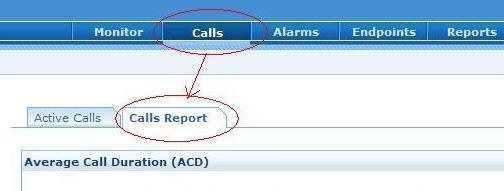
Today we’ll see what’s present in the all new 'Calls Report' section, found under VQManager’s “call” tab.
For the sake of simplicity, VQManager broadly categorizes calls as either Successful or Unsuccessful calls. Further categorization is done based on the call tear down status.
Unsuccessful Calls split
Analysis has to be started once a call fails, ie an Unsuccessful call. It is almost impossible to debug each and every unsuccessful call that happens in the network so VQManager’s 'Unsuccessful Calls split' pie chart lists the 'Top 10' reasons for unsuccessful calls. In a call center or large enterprise the 'Busy Here' reason will be of greater concern unlike the small enterprise where other failure categorizes such as ‘Server error’ or ‘Not found’ will be of high priority. Real troubleshooting of failed/error/unanswered calls begins here. Picture pasted below shows the hybrid environment running SIP, SCCP and H.323 protocol and the pie chart is consolidated across protocols to give greater visibility into call failures.
Successful Calls split based on quality
Once a call is categorized as successful, further concern is whether that call has acceptable quality? How was the user experience? A successful call will have call initiation signaling packets, media traffic (RTP) and tear down signaling. VQManager segregates a successful call with media (RTP) traffic into Good, Tolerable or Poor based on the MOS (Mean Opinion Score) of a call. MOS is a consolidated QoS metric, which is derived from a ITU-T formula, which takes into consideration other quality metrics such as delay, jitter, loss, codec etc.,. The new 'Quality Split' pie chart under 'Calls report' of VQManager 6.3 helps in identifying call quality - whether they are Good, Tolerable or Poor. QoS distribution percentage and the call numbers are provided on mouse-over. Further troubleshooting of Poor, Tolerable quality calls begins here.
While monitoring your VoIP set-up, two high priority areas to be tracked are QoS(Quality of Service) and Call drops. In our upcoming release, we have added two new graphs which help in quicker troubleshooting of poor call quality and call drops.
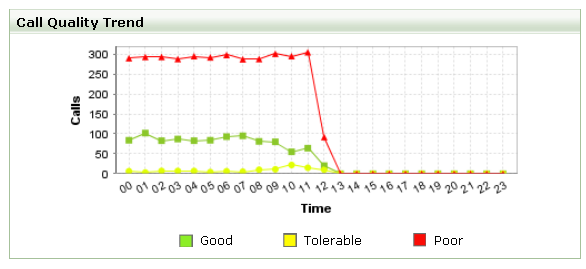
1. The 'Call Quality Trend' graph
This new graph is a line chart plotted every hour, showing the successful calls categorized based on quality distribution [Good, Tolerable and Poor]. One can click on any of the data points and drill-down to the call list showing the calls that contributed to the bad quality and further debug by accessing individual Call Details pages. Based on the history data range chosen in the calendar,
one gains insight on the call quality deterioration on an hourly/daily/weekly/monthly basis. As always, you can easily compare various weeks' peaks and lows to analyze traffic patterns and foretell network capacity needed.
NOTE: In VQManager, the quality of a call is determined based on the MOS score of a call. The MOS
score takes into account all other quality metrics such as delay,
jitter, loss, codec etc., in a call. The MOS thresholds are user configurable. Here's the default VQManager scale of call quality using MOS values.
Good MOS > 3.6
Tolerable MOS > 3.1 && MOS < 3.6
Poor MOS < 3.1
2. The 'Call By Status' pie chart
'Call By Status' is a pie chart having percentage of Successful calls, Unanswered calls, Error calls & Unmonitored calls. With this, one can easily identify which type of calls are largely prevalent in the VoIP network. In call centers, one would not want a high number of unanswered calls. In the case of an enterprise or VoIP service provider, it is Error calls that will be a source of headache. The mouse-over on the pie will show you the number of calls contributing to the particular call status.
By clicking on the link one gets all the respective calls in a list
view, from where one can either drill down to the Call Details page or
search for the Initiator and Participant to drill down and
troubleshoot. 
Wait for a few more weeks and you can use the above graphs live in your environment.
ManageEngine VQManager monitors VoIP calls made by any VoIP equipment that supports SIP, H.323, SCCP, RTP & RTCP protocols. Visit these links for a quick brief on VQManager's capabilities:
Regards,
Subash
Follow us on Twitter
Hey all,
Hope things are fine and in the best of spirits.
It’s again time for good news from our side. Get ready to shed the old and embrace the new. We happily announce the release of VQManager 6.1.1, a milestone release quickly following VQManager 6.1. The 6.1.1 version comes with feature enhancements, a cool new User Interface and also some fixes. Thanks to you all for the valuable feedback and the suggestions.
You can get hold of VQManager 6.1.1 from here . And here are the Release Notes.
Will ring you soon with another update.
So long…
Post the H.323 release, VQManager continues to go places and this time we are accompanying a big ManageEngine team alongside dedicated ManageEngine European partners. Mark Miller's team at VoIPPlannet and TMCnet gave us just the right beginning to our "shout-out-loud" plans on letting the VoIP world know of a truly simplified, complete, cost-effective VoIP monitoring solution ;). Now that VQManager supports most VoIP protocols in the market, we're quickly adding features and improving on performance - expect the next product release very soon!
So Europe, we're coming over to meet u in your neighbourhood. We're arranging a Roadshow from Denmark to Sweden, France, Italy, Germany, Portugal, Poland and the UK on September 8th to October 3rd.
Check out the dates here: http://manageengine.adventnet.com/euroroadshow/agenda.html
Our speakers: http://manageengine.adventnet.com/euroroadshow/speakers.html
You can register here: http://manageengine.adventnet.com/euroroadshow/registration.html
We very look forward to meeting you!
We’ve built you a configuration wizard that’s more than just pretty.
This screen appears when a user logs into VQManager for the first time. All first-time users can now breeze through the steps to set up VQManager to start reporting on VoIP traffic. Access the help card found on the top right corner of the wizard for more details on each screen.
So it’s not just the product log-in screen that’s got prettier in the latest VQManager 6.1
As we had promised, here we are with the inbuilt option to get a packet capture of your VoIP traffic for troubleshooting.
If you felt even one is more, no problemo.. Enough of the sniffer.exe… command, the option blah blah for the capture. ![]()
Here’s how simple it is!!
As you click on the ‘Create the latest support information file‘ from the ‘Support’ tab, you get this form to fill up the details. Just check the ‘Add packet capture file to support log information’ checkbox and enter the details.
Click on ‘Send’. In a few moments, the job’s done. The rest we don’t need to say, do we??
we’ll be back with more…
cheers,
Raj.
We’ve been having a great month. The latest Beta that supports the H.323 protocol has been received well by our testers and evaluators and we now want a lot more of you to have a feel of it.
ManageEngine is travelling to the US for two shows:
NXTcomm 08, June 16-19, 2008, Las Vegas, NV, Booth SU8207
Cisco Live, June 22-26, 2008, Orlando, FL, Booth 332
The team includes Sujith Regan from VQManager. Go ahead and get to know in and out of VQManager with this guy! Technical feasibilities, product direction, VQManager – the beginnings, deployment advise, limitations, tips.. Regan’s the man.
See you soon. Cheers!
VoIP protocols to support.. alarm triggers to add.. inbuilt reports to have.. QoS & other call details to track..
In addition to sending us your feature requests, you can now post them in an open forum and check out how popular your requested feature is with other VQManager users.
http://roadmap.manageengine.com/index.php?category=VQManager
Do post your feature requests using the link above and make yourself a part of every release VQManaqer goes through!
Thanks,
Team VQManager